When talking about building websites or applications, most developers usually jump straight into questions like:
“What stack should we use?”
“React or Vue?”
“Node.js or Laravel for the backend?”
But before getting into coding, there’s one thing that’s often overlooked even though it’s actually pretty important:
PRD (Product Requirement Document)
I used to be the type of developer who jumped directly into coding too.
Especially for smaller projects or clients who only wanted something like a “company profile website + admin dashboard”. Documentation felt like a waste of time.
But after working on more projects:
- revisions started getting out of control,
- features suddenly kept getting added,
- the scope changed in the middle of development,
- developers became confused,
- and clients felt the final result didn’t match expectations.
That’s when I realized why PRDs actually matter.
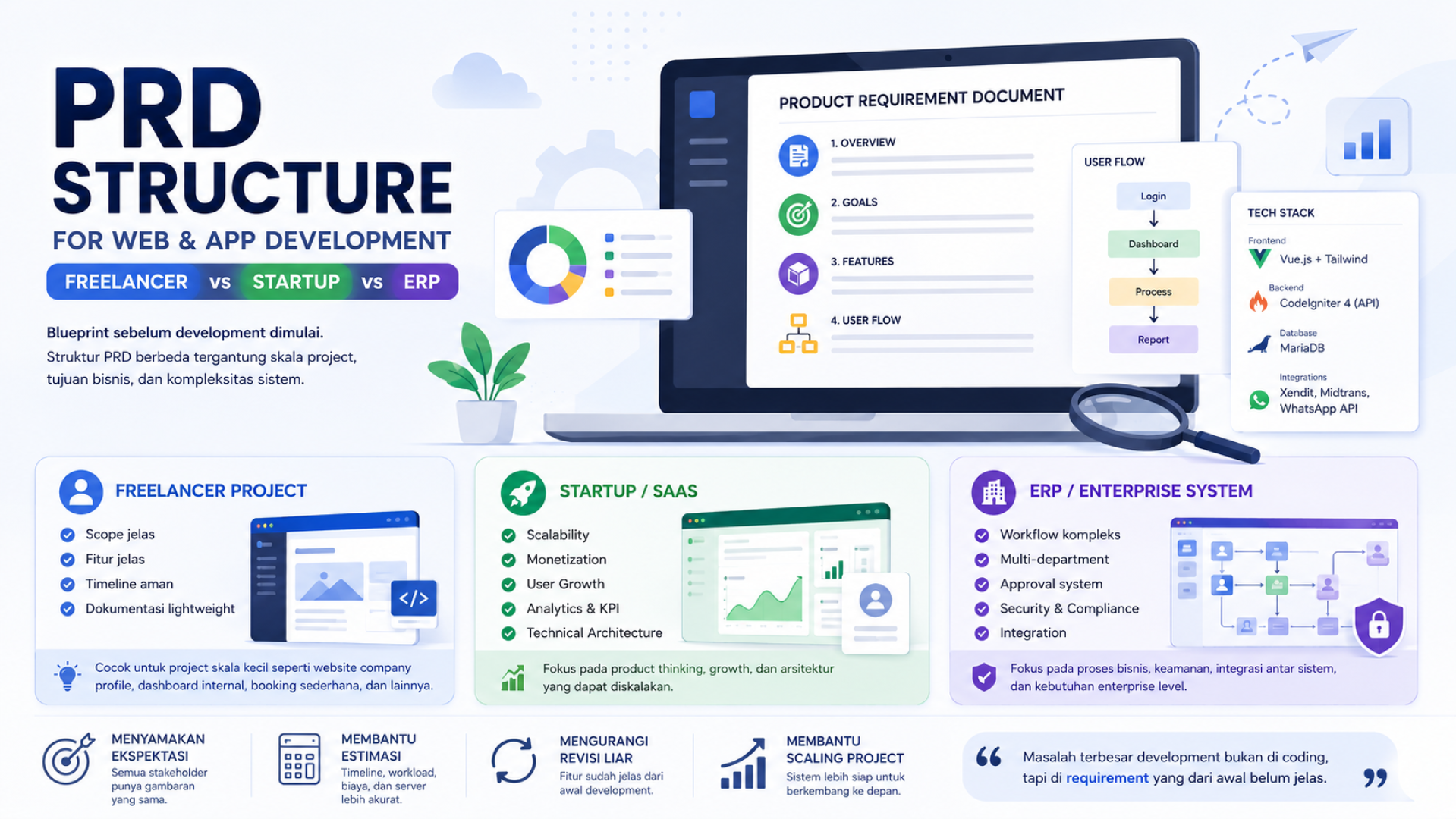
The interesting part is that PRD structures are different depending on the type of project.
A PRD for freelance work is very different from a startup SaaS product.
And startup PRDs are completely different from ERP or enterprise systems.
In this article, I want to talk about practical PRD structures commonly used in real-world web and app development.
Not academic theory.
But approaches that are actually realistic for real projects.
What Is a PRD?
PRD stands for Product Requirement Document.
It’s a document that explains:
- what will be built,
- who the users are,
- what features are included,
- how the system works,
- and the overall product goals.
Simply put:
A PRD is the blueprint before development starts.
PRDs aren’t only for large startups.
Even small freelance projects still benefit from a lightweight PRD.
At minimum, it helps make sure:
- the scope is clear,
- the timeline is more realistic,
- revisions are more manageable,
- and developers aren’t coding while guessing requirements.
Why Is a PRD Important?
Many development problems actually aren’t caused by coding skills.
They happen because requirements were unclear from the beginning.
Some common examples:
- “Oh, apparently we also need an approval flow.”
- “Turns out the dashboard should be different for each role.”
- “We also need PDF export.”
- “Oh, there should be a payment gateway too.”
When requirements like these appear in the middle of development, projects usually start becoming chaotic.
That’s why PRDs are important.
1. Aligning Expectations
Clients, designers, developers, and stakeholders all end up with the same understanding.
2. Helping With Estimation
It becomes easier to estimate:
- timelines,
- workloads,
- server requirements,
- and development costs.
3. Reducing Uncontrolled Revisions
Because features are documented from the start.
4. Supporting Project Scalability
Especially when the project grows into:
- SaaS platforms,
- marketplaces,
- AI tools,
- or multi-user systems.
General PRD Structure
Even though every project is different, most PRDs usually contain these core sections:
1. Product Overview
This section includes:
- application name,
- product goals,
- and the problem being solved.
2. Goals / Objectives
The target outcomes of the application.
Examples:
- speeding up booking processes,
- reducing manual work,
- increasing sales.
3. Target Users
Who will use the application.
For example:
- admins,
- customers,
- staff,
- owners,
- resellers.
4. Features List
A list of the main features.
Usually divided into:
- MVP features,
- future features.
5. User Flow
The application usage flow.
Example:
Login
→ Dashboard
→ Create Order
→ Payment
→ Report
6. Functional Requirements
Detailed explanations of how features should work.
Examples:
- the system must prevent double bookings,
- payments should expire automatically,
- admin roles can approve data.
7. Technical Architecture
Usually includes:
- frontend,
- backend,
- database,
- API,
- hosting,
- third-party integrations.
8. Timeline
Development milestones and schedules.
Should Technical Architecture Be Included in a PRD?
In my opinion: yes.
At least for modern projects.
Especially if the project involves:
- SPA dashboards,
- SaaS platforms,
- booking systems,
- AI tools,
- analytics platforms,
- marketplaces.
Because technical architecture helps with:
- development estimation,
- scalability planning,
- stack selection,
- developer task distribution.
Usually something simple like this is enough:
Frontend:
Vue.js + Tailwind

Backend:
CodeIgniter 4 REST API

Database:
MariaDB

Integrations:
Xendit, Midtrans, WhatsApp API
For enterprise-level projects, technical documentation is usually separated into:
- Technical Design Documents,
- Infrastructure Architecture,
- API Contracts,
- and other technical documents.
PRD for Freelance Projects
For freelance-scale projects, PRDs don’t need to be overly complicated.
The main focus is usually:
- clear scope,
- safe timelines,
- controlled revisions.
Typical Structure
1. Project Overview
2. Goals / Objectives
3. Target Users
4. Features List
5. User Flow
6. Functional Requirements
7. Technical Stack
8. Timeline
9. Scope & Limitation
10. Deliverables
This kind of documentation is usually enough for:
- company profile websites,
- internal dashboards,
- simple booking systems,
- landing pages,
- small business POS systems,
- custom admin panels.
And in the real freelance world, sometimes the PRD is simply:
- Google Docs,
- Notion pages,
- or cleaned-up WhatsApp conversations.
PRD for Small Startups / SaaS
Once you enter the startup or SaaS world, the mindset starts changing.
It’s no longer only about features.
Now you also think about:
- scalability,
- monetization,
- retention,
- analytics,
- user growth.
That’s why startup PRDs are usually much deeper.
Typical Structure
1. Product Vision
2. Problem Statement
3. Target Market / User Persona
4. Value Proposition
5. Competitive Analysis
6. MVP Scope
7. User Journey
8. Core Features
9. Functional Requirements
10. Technical Architecture
11. Monetization
12. KPI / Metrics
13. Roadmap
14. Scalability Plan
Startups usually begin considering things like:
- subscription models,
- multi-user systems,
- analytics,
- API integrations,
- AI features,
- growth strategies.
Technical architecture also becomes more critical.
For example:
- authentication strategies,
- queue systems,
- caching,
- multi-tenant structures,
- object storage,
- background workers.
Because poor system design early on can make scaling extremely expensive later.
PRD for ERP / Enterprise Systems
ERP or enterprise systems operate at a completely different level of complexity.
It’s no longer just about the application itself.
It’s about:
- business workflows,
- approval processes,
- security,
- auditing,
- compliance,
- and inter-department integrations.
Typical Structure
1. Executive Summary
2. Business Process Mapping
3. Department Scope
4. User Roles & Permissions
5. Functional Modules
6. Workflow Rules
7. Functional Requirements
8. Data Structure
9. Integration Requirements
10. Security Requirements
11. Compliance Requirements
12. Non-Functional Requirements
13. Infrastructure Architecture
14. Deployment Strategy
15. UAT (User Acceptance Testing)
16. Maintenance & Support
ERP systems commonly involve:
- HR,
- finance,
- procurement,
- inventory,
- sales,
- reporting.
Approval flows can also become highly complex.
Example:
Staff Request
→ Manager Approval
→ Finance Approval
→ Procurement
→ Inventory Validation
→ Purchase Order
At this level:
- audit trails,
- role permissions,
- backups,
- disaster recovery,
- compliance,
become critical parts of the PRD.
So Which PRD Structure Is the “Correct” One?
The answer is:
It depends on the scale of the project.
The most common mistakes are:
Making Small Projects Too Complicated
Documentation ends up taking longer than development itself.
Making Large Projects Too Simple
Which eventually causes chaos during development.
The Most Realistic Approach (In My Opinion)
Freelance Projects
Use a lightweight PRD.
The important thing is:
- clear scope,
- clear features,
- clear timeline.
Startup / SaaS
Start focusing seriously on:
- product thinking,
- scalability,
- monetization,
- technical architecture.
ERP / Enterprise
Focus on:
- business workflows,
- approval systems,
- security,
- integrations,
- compliance.
Closing Thoughts
Nowadays whenever I build projects like:
- SaaS platforms,
- analytics dashboards,
- booking systems,
- or AI tools,
I always create at least a lightweight PRD before development starts.
It doesn’t need to be overly formal.
But it should be enough to:
- map out features,
- identify technical requirements,
- define the scope,
- and avoid chaos during development.
Because the bigger the project becomes,
the more expensive miscommunication gets.
And very often,
the biggest problem in development isn’t the coding itself.
It’s unclear requirements from the very beginning.